
Sindh Job Portal (SJP) New Notification: Mandatory Rural/Urban Selection & Profile Correction
Latest Update: April 02, 2026 | Reported by Sindh Study Hub Team
⚠️ Urgent Action Required
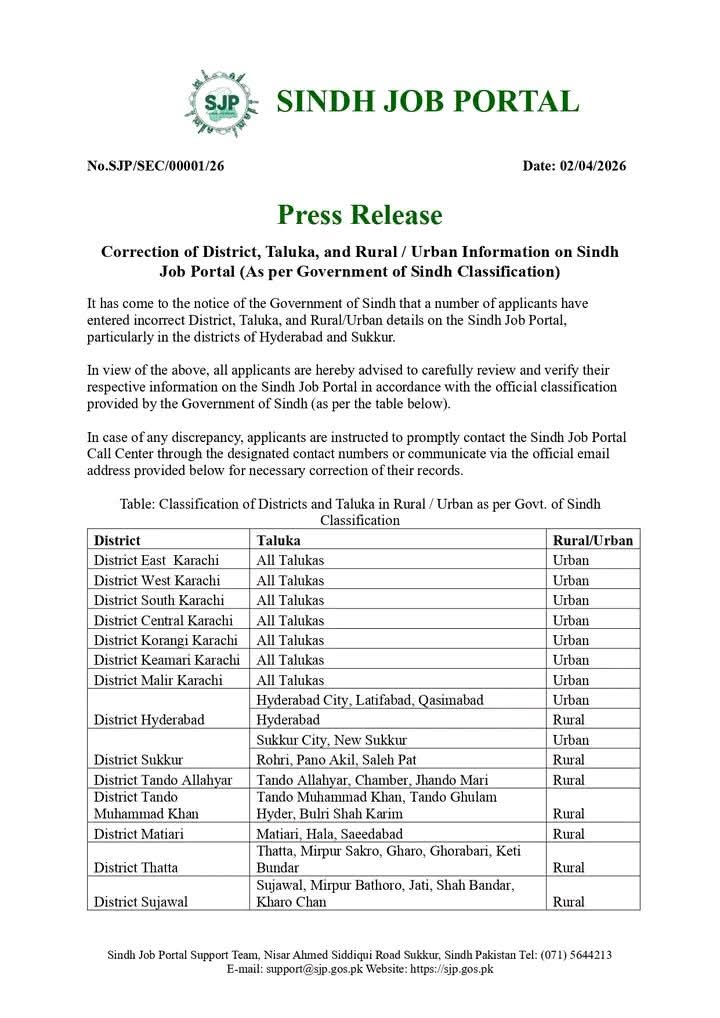
The Government of Sindh has noticed that many applicants have entered incorrect District, Taluka, and Rural/Urban information on the Sindh Job Portal. Since recruitment is based on specific quotas, incorrect data will lead to automatic disqualification from upcoming SPSC and department jobs.
Why the Rural/Urban Option is Critical?
In Sindh, government job vacancies are strictly distributed between Rural (60%) and Urban (40%) quotas. If your Domicile states “Rural” but your SJP profile is set to “Urban,” you will not be eligible for seats reserved for your area. To ensure fairness, the SJP management has opened a window for profile correction.
You can manage your profile directly at the official portal: sjp.gos.pk.
Official Classification List (Press Release 2026)
Refer to the following table to select your correct Area Type based on the official Government of Sindh classification:
| District | Taluka/Area | Classification |
|---|---|---|
| Karachi (All Districts) | All Areas (East, West, South, etc.) | Urban |
| Hyderabad | City, Latifabad, Qasimabad | Urban |
| Hyderabad | Hyderabad (Rural) | Rural |
| Sukkur | Sukkur City, New Sukkur | Urban |
| Sukkur | Rohri, Pano Akil, Saleh Pat | Rural |
| Tando Allahyar / Matiari | All Talukas | Rural |
[AdSense In-Article Ad Unit]
Step-by-Step: How to Update Your Area Type
- Visit the official portal at sjp.gos.pk.
- Log in using your CNIC and password.
- Click on the “My Profile” tab.
- Scroll down to the “Address & Location” section.
- Find the “Area Type” dropdown menu.
- Select Rural or Urban based on the domicile certificate.
- Submit the changes and verify they are saved.
Technical Support & Help
If you encounter any errors (e.g., the Rural/Urban option is missing or grayed out), contact the support team immediately:
- Phone: (071) 5644213
- Email: support@sjp.gos.pk